CHAITANYA GADDAMWAR


Figma to a Live Web App using AI-UX Workflows
Taleo was a fully designed and prototyped storytelling app that only ever existed as a Figma file. I had already built a solid design system for Taleo, with defined components, tokens, typography, and a consistent visual language. That foundation made the next step feel natural. I took the design into Claude Code and built Taleo into a working app.
Taleo was primarily designed as an iPad iOS app and secondarily for the web. I built the web version specifically to explore Claude Code as a workflow tool. It was never intended to be the final product, but a way to test how far a design system could take a real build.

01. How I Used AI Across the Project?
Different AI tools played different roles and I was deliberate about which one I used for what.
I used ChatGPT to generate illustrations in different visual styles, which I used as placeholder images across the app. I also used it to synthesise anonymised research data and identify common patterns. This helped me make faster and more confident feature decisions without getting lost in raw notes
Claude Code handled the build. Once I had a clear design system and knew what I wanted to build, I used Claude Code to translate that into a working product. My job was to direct it, review the output, and make decisions when the design needed to adapt to real constraints.
Cloudinary handled image hosting and Vercel handled deployment. Together these tools gave me a complete workflow from design to a live product.
02. The Build Process
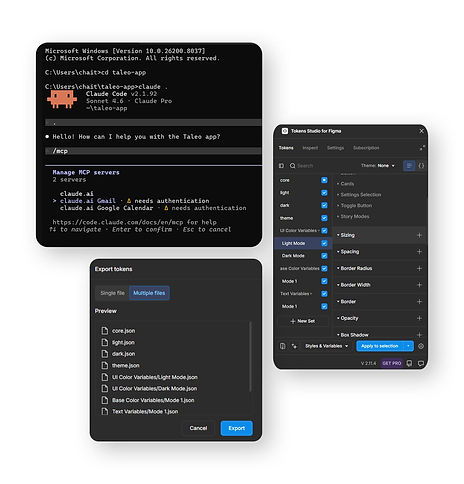
I started by connecting Figma to Claude Code using MCP. This was my first time ever using a terminal. I have zero coding knowledge and the initial setup felt unfamiliar and intimidating. But every time I hit an error or did not understand something, I asked Claude directly and it walked me through it. That feedback loop made the learning curve manageable.
I used Tokens Studio to export the design tokens, which gave Claude Code a structured and accurate reference for colors, typography, spacing, and other core values. It read the complete file including all the exported tokens and components. That first session was going well until my API limit hit almost immediately after the file was processed.
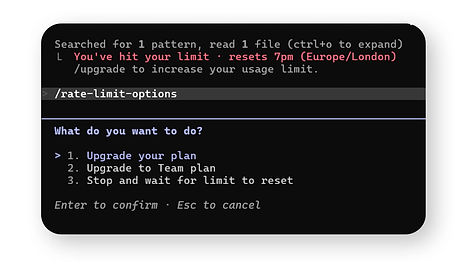
Hitting API token limits was the most disruptive part of the process. When the limit reset, Claude Code lost context of what we were working on and I had to spend time rebuilding that context before moving forward. It wasted tokens and slowed things down. Over time I learned to plan my sessions better and break the work into smaller focused chunks to avoid losing progress. One thing that helped was not shutting my laptop down. I just locked the screen and came back after the limit reset. Keeping the session open meant Claude Code retained more context and I could continue almost exactly where I left off.
03. What I learned in the process?
Most of what I designed in Figma translated accurately into the live build. The design system did most of that work. But the live site threw up its own problems that Figma could never have predicted.
-
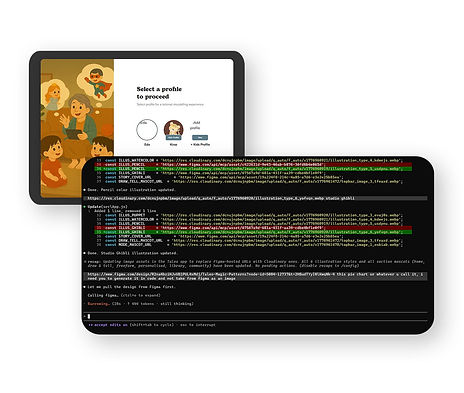
The images I pulled from Figma links expired after 7 days and broke on the live site. I moved everything to Cloudinary and replaced them with permanent URLs. I also converted all images to WEBP to improve load speed. Both were decisions that only matter when something is actually live.
-
Working on microinteractions directly on the live site felt easier and more satisfying than Figma prototypes. The feedback was immediate and the result felt real.
-
I also noticed that Claude Code understood my intentions much better when I shared direct Figma screen links rather than only describing changes through text prompts. But I am aware that is not a sustainable way to work going forward. There is no long term sense in designing screens in Figma just to convert them into code. That workflow will need to evolve.
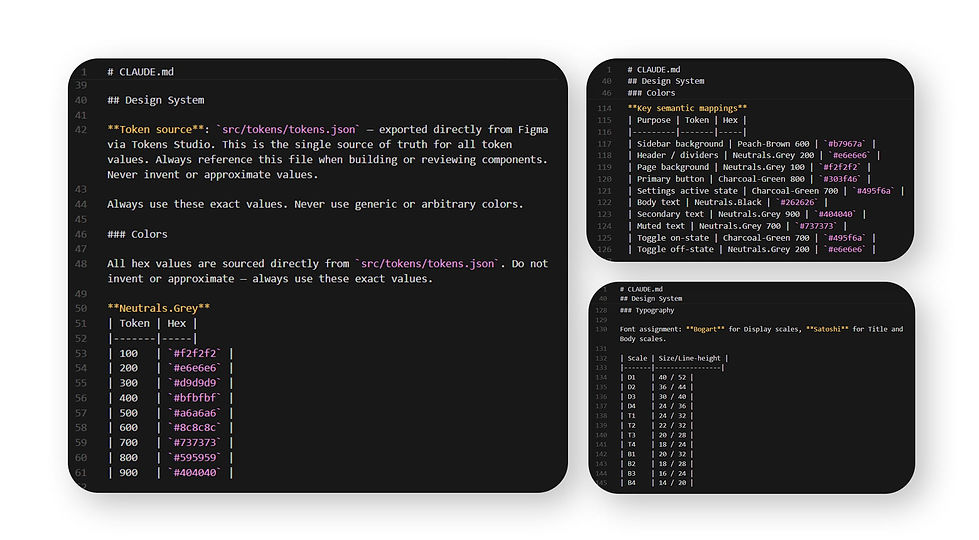
The design system proved to be the most important foundation throughout. Hard coded values do not scale. Every time something was hard coded it created problems later. A well structured design system is not just good practice when vibe coding, but essential.

The one thing I would do differently is learn some basic coding earlier. There were moments where I burned through large amounts of tokens on small changes that someone with even basic frontend knowledge could have fixed in minutes. Understanding a little code would have saved a lot of time and tokens.
04. How AI is changing the Product Design Workflow?
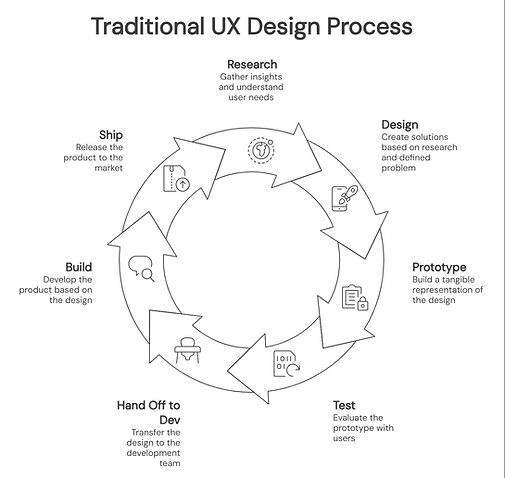
The traditional design process has always followed a predictable sequence, at least in theory. Research, design, prototype, test, hand off to development, build, and ship. Each step was separate and each handoff created distance between the original design intent and the final product. AI is collapsing that sequence.

What a better workflow could look like?
Designers should have the freedom to make changes manually when needed, not just through prompts. That freedom could save significant time and keep the design intent intact without depending entirely on AI to interpret every decision.
When the design system is solid and the intent is clear, AI can move from design to a working product with very few steps in between. That is a genuine shift and one that saves significant time. But as the intermediary steps get reduced, more time should be focused on user research and user testing, which was earlier skipped sometimes entirely.
The friction problem
AI does not get the design right 100% of the time. There is always a gap between what one thinks and what gets built. When a designer has to repeatedly correct the output, fix small things, or rephrase instructions, the friction adds up. I call this design debt. Over time there is a real risk that designers start unconsciously adjusting their design decisions to fit what AI can produce easily, rather than what users actually need.
The goal should always be that AI serves the designer's intent, and AI should suggest, not the other way around. The moment a designer starts thinking about what AI can handle before thinking about what the user needs, the whole purpose of user experience has been lost.
The collaboration problem
Design debt is not the only open question. Collaboration and feedback review remain unsolved. Figma works so well for teams because everyone, designers, developers, product managers, and clients, can comment, review, and iterate in one place. Vibe coding tools do not have that yet. Right now they are largely solo workflows. Until they solve for collaboration at scale, this way of working cannot become the industry default.
05. Key Takeaway for Me
UI design can no longer just be screens for me. I believe every design decision will eventually be backed by a real working frontend, not a prototype, across all mediums. We are not fully there yet, but the direction is clear. There is also no longer a reason to design screens and hand them off to be coded separately, at least the frontend part, when the two can happen together.
But more than the tools, I think this is one of the most exciting times to be a UX designer. As AI gradually takes over the responsibility of producing UI, we are freed up to focus on what actually matters, that is experience design itself. Not just screens, but how people interact with AI agents, navigate AR/VR environments, respond to audio interfaces, and move through agentic experiences where there may be no screens at all. The canvas is expanding and so is the definition of what a designer does.
For a long time UX has sat in the shadow of UI. Now that AI can produce interfaces faster than ever, the real differentiator is the thinking behind the experience. Understanding human behaviour, designing for context, and asking the right questions before any tool is opened. That is the work that cannot be automated. And that is a genuinely great place to be.